ContentFlow365

Your identity. Your team. Your marketing.

Keep your brand in view when it is time to decide.

Connected creatives, campaigns and reports for Meta Ads and Google Ads.

ContentFlow365 ·

Zadie · Ads

Meta Ads and Google Ads in one dashboard.

Create messages and creative assets, organize campaigns and review results. Zadie connects ad production with Meta and Google dashboards inside ContentFlow365.

ZadieOne specialty in your AI team

AdsZadie

Fewer tools. More marketing.

Replace your subscription to…

Madgicx
US$45/moPro Complete
Billed monthly; ad spend below US$1,000/month

Manage ads and analyze results

Meta and Google Ads campaigns, metrics and audiences
View plan and terms ↗
AdSpy
US$149/moStandard
Advertised offer; billed monthly

Find advertising references

Connected Research and Ads Intelligence
View plan and terms ↗

Manage your ads without leaving ContentFlow

Meta Ads Manager
US$0/moFree tool
Ad spend is paid to Meta.

Manage Meta Ads campaigns

Meta campaigns, audiences and results in ContentFlow365
View platform ↗
Google Ads
US$0/moFree tool
Ad spend is paid to Google.

Manage Google Ads campaigns

Google campaigns, conversions and reports in ContentFlow365
View platform ↗

Meta and Google alongside your content and results. Ads Intelligence from Creator at €99/month. Ad spend is paid to each platform.

See full comparison →
References checked Sep 5, 2026, in the currency shown. Taxes, usage and limits depend on provider. Comparison covers the described tasks.

Your advertising workspace

Meta and Google Ads, inside ContentFlow365.

Review results, organize campaigns and inspect audiences, conversions and reports where you create your assets.

Meta AdsLast 7 days · example
ContentFlow365Illustrated view
Spend$240
Clicks1.2k
Leads36
Performance over time
Campaign · AcquisitionActive
Campaign · RetargetingActive
Campaign · New offerDraft

Illustrated dashboard with sample data. Your ad account, permissions and spend remain with Meta or Google; available actions depend on the connection.

How the work begins

Here’s how to get started.

  1. 01

    Start with your offer

    Select your brand, campaign and message. Define what the asset should accomplish.

  2. 02

    Prepare your creative

    Work on angles, copy and assets. Check that the promise matches the destination page.

  3. 03

    Review and measure

    Confirm account, audience, budget and permissions before publishing. Consult data from the connected channel.

Your tools

Everything you can do.

ContentFlow365Illustrated view
01Script
02Scene
03Video
01

Messages rooted in your business

Angles and Copy Engine
Develop approaches and copy to introduce your offer to different needs.
AI creative
Prepare images and videos using brand and campaign context.
Continuity after the click
Connect your ad to a landing page and sales follow-up, depending on your plan.
ContentFlow365Illustrated view
Spend$240
Clicks1.2k
Leads36
Performance over time
02

Meta Ads management

Campaigns, ad sets and ads
View and organize the levels of your connected ad account.
Audiences and budget
Review targeting, market, budget and schedule before activation.
Status and comments
Review ad status and Meta comments in the same workspace.
ContentFlow365Illustrated view
Reels
Ads
Trends
Save referenceCreate your own angle
03

Intelligence and connections

Metrics and reports
Review spend, reach, impressions, clicks, CTR, leads and cost per result. Filter by period and use AI reports to understand performance.
Ads Intelligence
Expand your analysis from Creator to inform the next decision.
Advertising channels
Manage Meta and Google from ContentFlow. LinkedIn, TikTok, Pinterest, X and ChatGPT Ads: coming soon.
ContentFlow365Illustrated view
Spend$240
Clicks1.2k
Leads36
Performance over time
04

Control before scaling

Gallery and filters
Find ads by name or status and review creative alongside its data.
Audiences and remarketing
Work with audiences and demographic signals; configure the audiences your campaign needs.
Pixel, CAPI and alerts
Review your pixel, CAPI and alerts to follow what happens after the click.
ContentFlow365Illustrated view
Spend$240
Clicks1.2k
Leads36
Performance over time
05

Google Ads, alongside your content

Dashboard and campaigns
Review spend, clicks and conversions by date. Organize campaigns and review ads from ContentFlow365.
Search, assets and targeting
Prepare ad text and assets, review targeting and connect the campaign to your business content.
Audiences, GA4 and Customer Match
Bring your Google Ads analysis together with its audiences and measurement tools.
ContentFlow365Illustrated view
AttractRegisterConversationOffer
06

From click to conversion

Funnels by channel
Review the campaign journey in both Meta and Google Ads and identify the stage that needs attention.
Conversions and measurement
Review conversion actions and Google Tag coverage; in Meta, inspect pixel and CAPI.
Reports and comments
Bring performance reports and Meta comments together with your campaigns.

Created with ContentFlow365

See the identity become content.

Selected production samples from Crea tu Clon. English versions.

Three questions, one asset

From an offer to an ad

In your business

Start with a real need.

Launch an offer

Prepare the message, visual asset and a page that continues the same promise.

Test a new approach

Develop creative variants and compare real data before deciding what to keep.

Reconnect with an audience

Prepare remarketing for audiences configured and authorized in your channels.

CUSTOMER STORIES

Real people.
Their content, going further.

ContentFlow customer stories: creating with your avatar.
Gorka Games

120,600views on one video

10× its usual performance

His AI-produced video passed 120,000 views. YouTube highlighted performance ten times above the channel’s usual level.

Since publication on June 18, 2026. Screenshot published in July 2026.
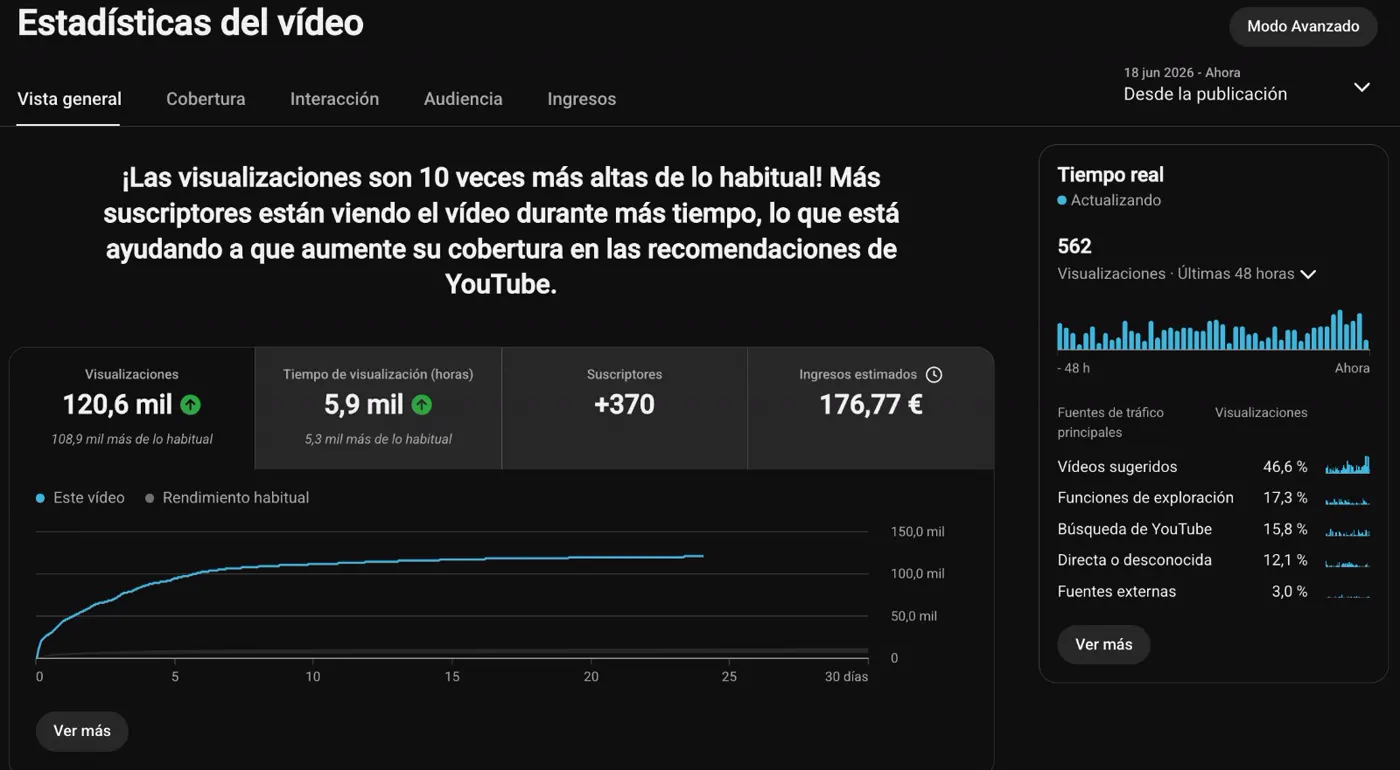
View the YouTube Studio screenshot
Gorka Games · 120,600 views on one video
Since publication on June 18, 2026. Screenshot published in July 2026.

“None of my long-time followers noticed that I was no longer recording myself.”

Gorka GamesGaming creator and educatorContentFlow365 customer
David Aranzabal

1.8Mviews in three months

1,796,116 in the period shown

His channel has worked with his clone since October 2024. It reached 1,796,116 views in the quarter shown.

The 2025 quarter shown. Case published in July 2026.
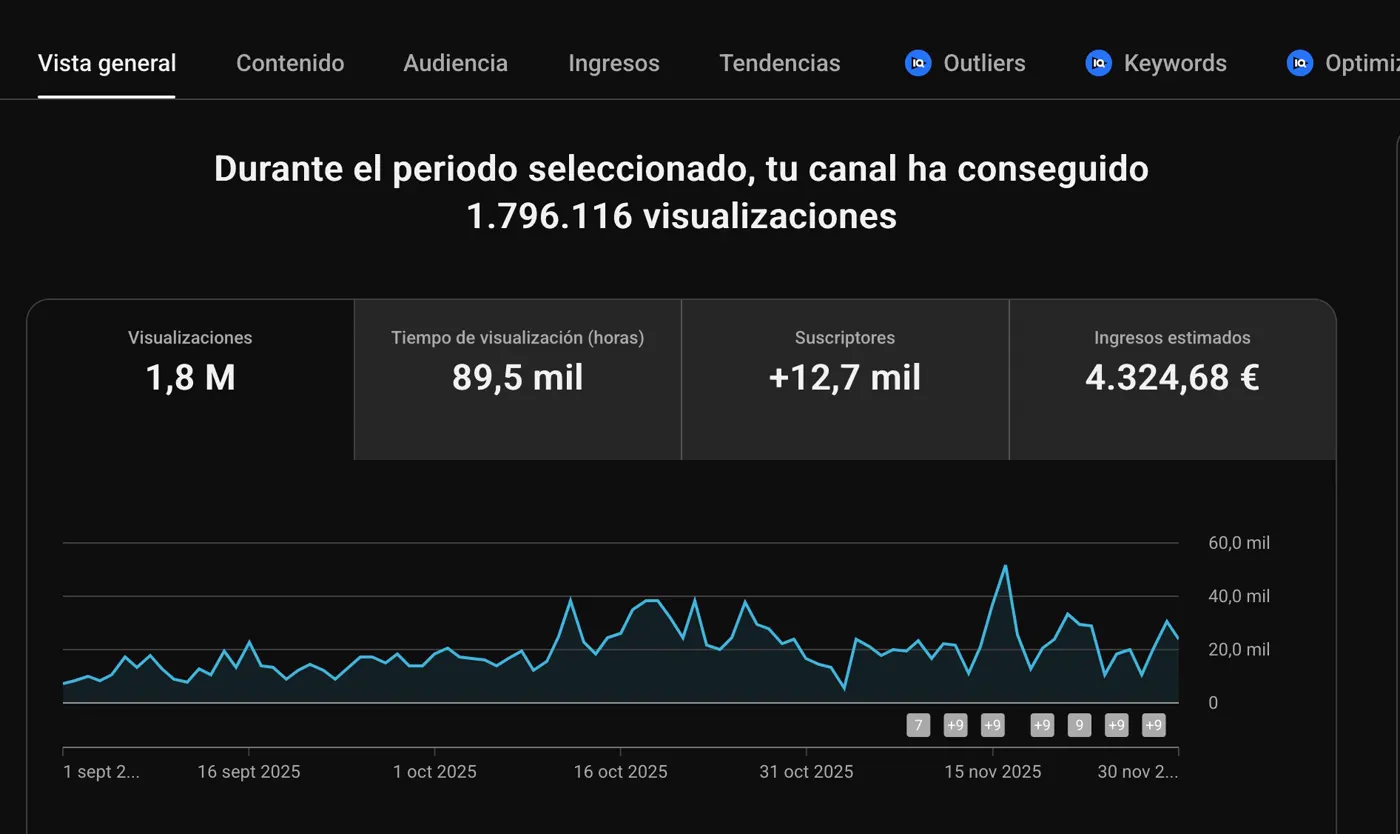
View the YouTube Studio screenshot
David Aranzabal · 1.8M views in three months
The 2025 quarter shown. Case published in July 2026.

“I stopped recording myself in October 2024.”

David AranzabalFounder of ContentFlow365Internal case · Education channel

Figures and testimonials published in the Crea tu Clon IA offer, July 2026. Testimonials translated from Spanish. View the original cases ↗

Your questions answered

Before you begin.

Do I need to open Meta and Google to review every campaign?

ContentFlow brings together Meta Ads and Google Ads dashboards with campaigns, ads and reports. Review activity in the same app where you prepare creative assets.

How do I turn an offer into an ad?

Build your message, copy and creative around the offer. Connect the asset to its campaign and the page receiving the click.

Can I see which ads are working best?

Review spend, impressions, clicks, CTR and results by period. Compare campaigns to decide which message or creative deserves attention.

How do I reach people who already know my brand?

Prepare remarketing audiences for people who have interacted with your business. Match your message to their stage in the journey.

Where do I control ad spend?

Your advertising accounts handle media spend. The dashboards help you track spend and results as you work on campaigns in ContentFlow.

Your starting point

From €39/month

Start with ContentFlow365. Explore the plans and choose the features you want to put to work.

Find the plan for the way you work.
Choose my plan ↗

Your identity. Your team. Your marketing.

Put your marketing to work.

Explore the workflow ↗Meet your whole team →