Your identity. Your team. Your marketing.
One idea. Seven assets. A clear next step.
Plan your first AI campaign: define your offer, find what to say and connect each asset to a page and a conversation. Download the kit and make it yours.
Free resource · PDF + editable text
Your first AI campaign
A template to decide what you will say, who it is for and what happens next. Includes a brief, seven ideas, a script and a follow-up workflow. The seven assets are content proposals, not included generations.
Clarify your offer
Six questions to choose an audience, a problem and one action.
Plan seven assets
Ideas with a question, an opening, a format and a next step.
Connect the journey
A script, a landing page and replies that keep the context.
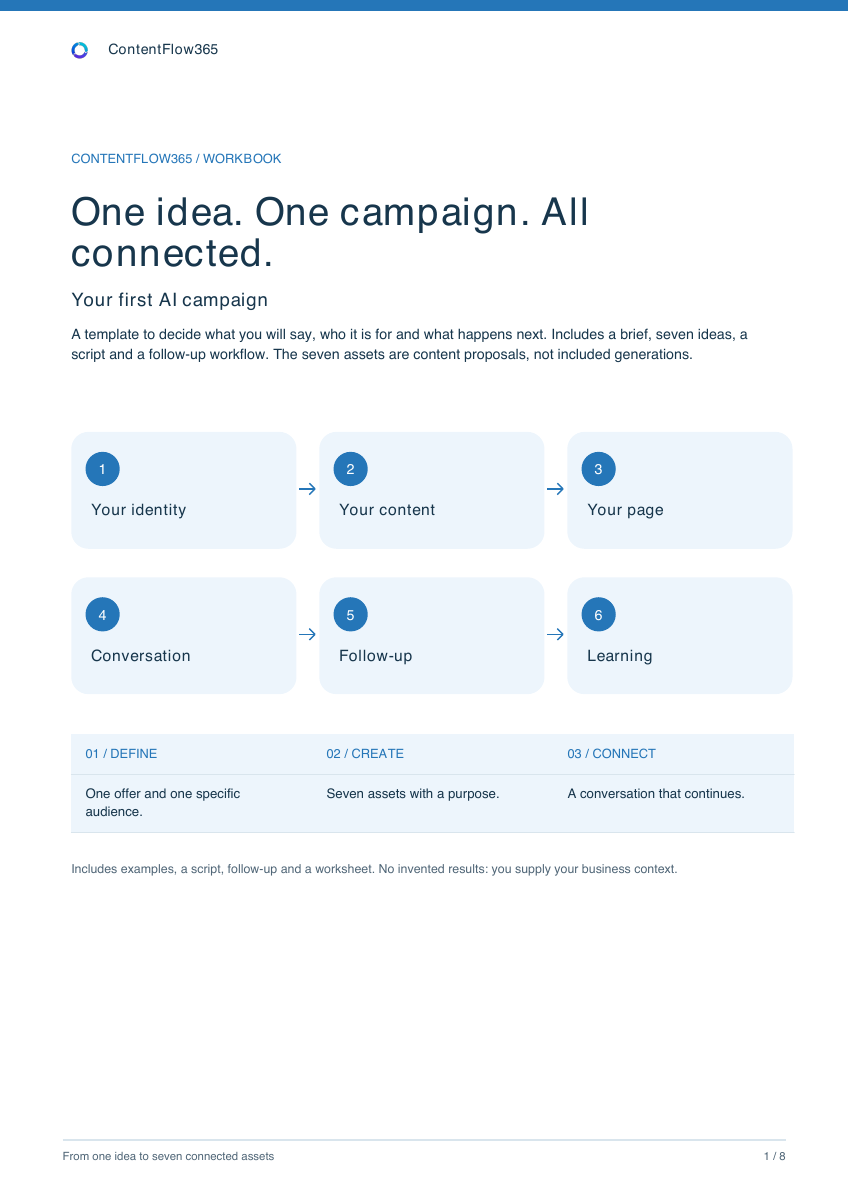
- 01Offer
- 02Content
- 03Page
- 04Conversation
Before asking AI for content
A clear brief connects every asset.
Choose one offer. If it takes three calls to action to explain it, narrow the scope before producing content.
- Audience
- Who do you want to help, and what is their situation?
- Problem
- What is preventing them from moving forward?
- Offer
- What exactly do they receive, and what is outside the scope?
- Available proof
- What can you demonstrate with a sample, a process or real data?
- Main action
- What happens next: read the outline, request information or book?
- Owner
- Who handles the reply and checks the next step?
Seven questions, seven ideas
Give your audience a reason to keep going.
Each asset answers a different question. Start with the ones you hear most often in conversations and keep the offer consistent.
- 01
The problem
Why don't my photos show what I see?
Your phone can capture more than you are showing.
Reel with an everyday sceneRead the course outline → - 02
A practical improvement
What can I try today?
Before changing your camera, change your position.
Demonstration of framingSee the next example → - 03
The objection
Do I need a professional camera?
Start by learning what to do with the one you have.
Avatar video with your own examplesCheck the requirements → - 04
The process
How will I learn?
One scene, one decision and an exercise to repeat it.
Carousel with three course stepsRead the syllabus → - 05
The proof
What will I see inside?
Here is how we analyse a photo in a lesson.
An authorised lesson excerptWatch a real sample → - 06
The fit
Is it right for me?
This course starts here. Check whether it is your next step.
Video on requirements and scopeRequest information → - 07
The invitation
How do I take the next step?
Want to explore the course? Here is the outline.
Offer summary with one CTARead the course outline →
These are not seven mandatory days or a posting frequency for every account. Adapt the order, formats and schedule to your audience.
After the click
Your content opens the door. Follow-up keeps it open.
The kit continues with a script, a landing-page outline and three sample replies. The CRM record keeps the source, interest, owner and next step so each conversation can continue.
Do I need a professional camera?
The course starts with a phone. Here are the requirements. If your situation is not covered, I can pass your question to the team.
- Interest
- Introductory course
- Next step
- Resolve the question about requirements
Before you download.
What do I get?
An eight-page workbook with a visual journey and worksheet, plus the core template in editable text. It includes illustrative examples and space to adapt the brief to your business.
Do I need ContentFlow365 to use it?
You can prepare the brief in any text editor. The examples explain a workflow you can later work on in ContentFlow365.
Are seven videos created automatically?
No. These are seven content proposals. Production needs your materials, review, and the features and capacity of your plan.
Is this a free trial of the app?
It is a free planning resource. It does not activate a subscription, credits or a three-day trial.
Your next campaign starts here
Prepare the message. Connect what happens next.
Want to see your AI team at work? Explore ContentFlow365 →