ContentFlow365

ContentFlow365

Create your avatar.
Put all your
marketing to work.

Your image, your voice and an AI team to connect content, ads, pages and conversations in one app.

Emili, part of the ContentFlow365 AI team
Your next creationAvatar · voice · editing
Keep the conversation going

Content, bots and CRM
with shared context.

All connected ↗

Discover ContentFlow: A Complete Video Tour

Video 100% created with ContentFlow. Copy, avatars, animations. Including editing.

Your video. Every layer. Every detail.

AI prepares the assets. Step into the edit and decide how they look, how they sound and when they appear.

Editor ProIllustrated editor · sample project
Explore its controls
Preview1920 × 1080 · 25 fps
An idea worth seeing.
Give your next idea a voice.
Timeline
00:0000:1500:3000:4501:00
Scenes
HookIntroMain contentCTA
Animations
010203
Custom B-roll
AB
B-roll
010203
Slides
010203
Avatar
010203
Voice
Lead voice
Music
010203
Avatar + voice synchronizedVisual layers + audio

You set the pace.

Split and trim clips, adjust their position and use snapping to align assets. Avatar and voice tracks preserve their synchronization.

Voice and music, each on its own track.

Adjust volume, fade-ins, fade-outs and fade curves. Review audio as you scrub through the timeline.

Give each scene a purpose.

Combine animations, motion and transitions. Edit each template’s available properties and review the result before rendering.

Precise editing

Trimming, splitting, timeline zoom and undo/redo.

Control each clip

Scale, position, opacity, volume and transitions.

All your assets together

Slides, B-roll, avatar, voice, music and animations in one edit.

Editor Pro abstraction based on its interface and controls. Available properties depend on the clip type and project.

Let them read. Let them listen.
Give them a reason to return.

Liv carries your content into your blog, podcast and email. Each format has its assets, review and publishing steps.

Your video or idea
Blog01
● ● ● tu-marca.com/blog
YOUR BRAND · BLOGYour video becomes
a worthwhile read.
SEO
Title + description

From video to article, with your structure.

Generate a draft and review its content, URL and SEO metadata before publishing.

What you can adjust
  • Title, description and keywords.
  • Content, images and slug.
  • Draft or published status.
Podcast02
YOUR PODCAST RSS
Ideas.
Your own voice.
EP. 01
00:00 08:30
EpisodeFeed RSSListeners

Your episodes, in your own feed.

Organize audio, artwork and descriptions. Publish your RSS feed and review listening by platform.

What you can adjust
  • Episodes and metadata.
  • Public RSS and distribution guidance.
  • Episode and platform statistics.
Newsletter03
SUBJECTAn idea for your next week
YOUR NEWSLETTERHello, Laura.

Here’s an idea you can put into practice.

Read the article →
Your brand
Selected audience

Bring the idea to your contact list.

Prepare the email, select the audience and review delivery with the campaign tools.

What you can adjust
  • Email content and preview.
  • Contact lists, tags and filters.
  • Recipient review and confirmation.

Illustrated views. Blog and podcast from Pro. Newsletters use compatible email tools, with sender, audience and delivery configured for your plan. Register your RSS feed with each platform using its instructions.

Meta and Google Ads, inside ContentFlow365.

Review results, organize campaigns and inspect audiences, conversions and reports where you create your assets.

Meta AdsLast 7 days · example
ContentFlow365Illustrated view
Spend$240
Clicks1.2k
Leads36
Performance over time
Campaign · AcquisitionActive
Campaign · RetargetingActive
Campaign · New offerDraft

Illustrated dashboard with sample data. Your ad account, permissions and spend remain with Meta or Google; available actions depend on the connection.

From your first video to your next sale.

Give every moment
of interest a next step.

Content opens the door. Ads extend your presence. Pages and bots capture interest so you can continue the conversation in your CRM.

Content
Ad
Page
L
LauraSample contact
Source
Instagram
Interest
Your service
Conversation
Shared context
Next step
Prepare follow-up
One person. One connected journey.

From “I’m interested” to your next opportunity.

The same contact connects the message, qualification and sales follow-up. Explore how Samir works.

InstagramWhatsAppEmail
Illustrated journey
L
LauraSample contact · Instagram
Inbox
Laura

I’m interested. How do I start?

OpportunitiesSample pipeline
L
LauraSource: Instagram
Context saved ✓

New1

Qualified0

Follow-up0

LLaura
Interested in the service

Lead generation

Next step defined
Next actionContinue with your team

Start with a conversation.

Bring together messages and comments from connected channels. Keep the source and contact so you can reply with context.

Ask the questions that matter.

Configure the bot’s role and qualification questions. Define when a person on your team takes over.

Keep the interest moving.

Organize the opportunity in its stage and prepare the next step: follow-up, a call or an appointment. You review its progress.

Sample journey. Channels, bots and automations require configuration and depend on your plan and connections.

Eight perspectives.
One place to start.

Stats · Your accountIllustrative example
Explore the reporting areas

Every step has its report.

01Funnel map
02Landing pages
03Sales
Visitors2400
Forms96
Conversion4%

Visits to your website

410Week 1
670Week 2
520Week 3
800Week 4

Find your next idea in the results.

01Videos
02Engagement
03Traffic sources

Interest continues through your pipeline.

01Contacts
02Opportunities
03Sales

Your live events have a journey, too.

01Your live event
02Your audience
03Your reports

Get into the detail of your campaigns.

01Meta Ads
02Google Ads

Illustrative example. Available data depends on your account and its connections.

LOCALIZATION

Your content.
In your audience’s language.

Adapt your ads, posters, carousels and Reels to bring the same message to new audiences. Your image and your brand, in every version.

MadridLondonParisBerlinRomeLisbonNew YorkMiamiMexico CityBogotáLimaSão PauloBuenos AiresCape TownLagosCairoDubaiMumbaiSingaporeTokyoSydneyLos AngelesTorontoVancouverNew York

New York · Madrid · London · Paris · Berlin · Rome · Lisbon · Miami · Mexico City · Bogotá · Lima · São Paulo · Buenos Aires · Cape Town · Lagos · Cairo · Dubai · Mumbai · Singapore · Tokyo · Sydney · Los Angeles · Toronto · Vancouver

90+ dubbing languages with ElevenLabs

EspañolEnglishDeutschFrançaisPortuguês… and many more

EnglishTranslation
EspañolOriginal

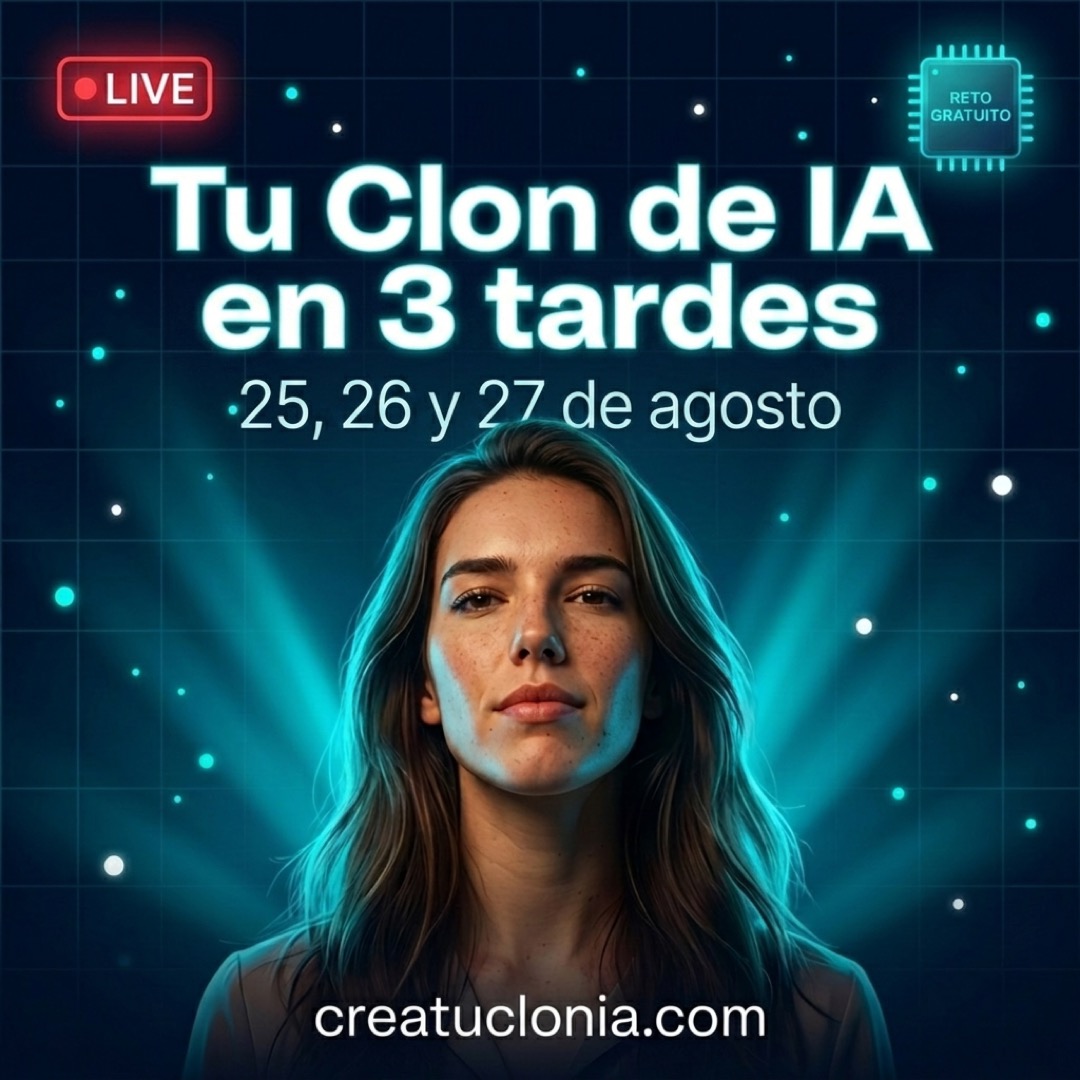
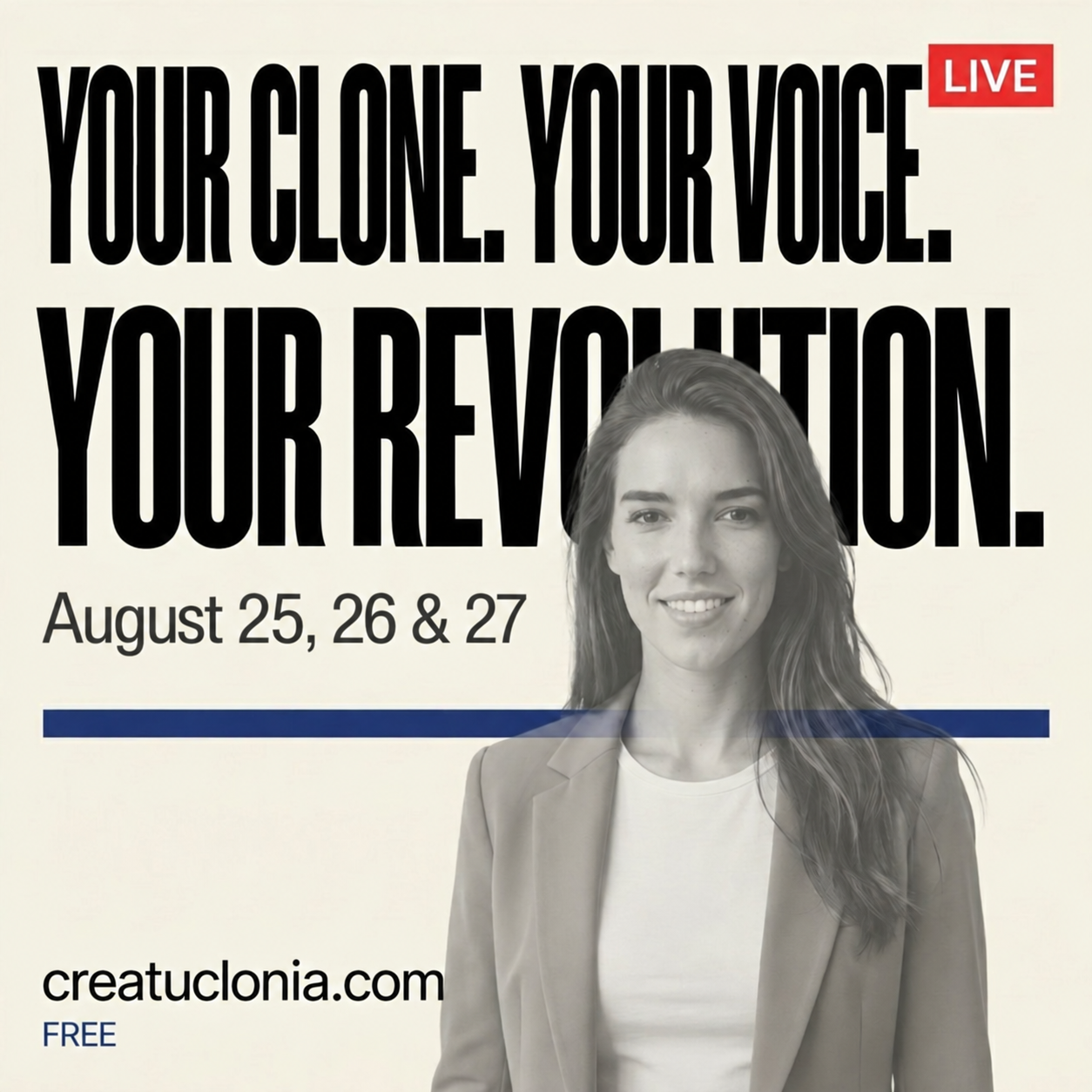
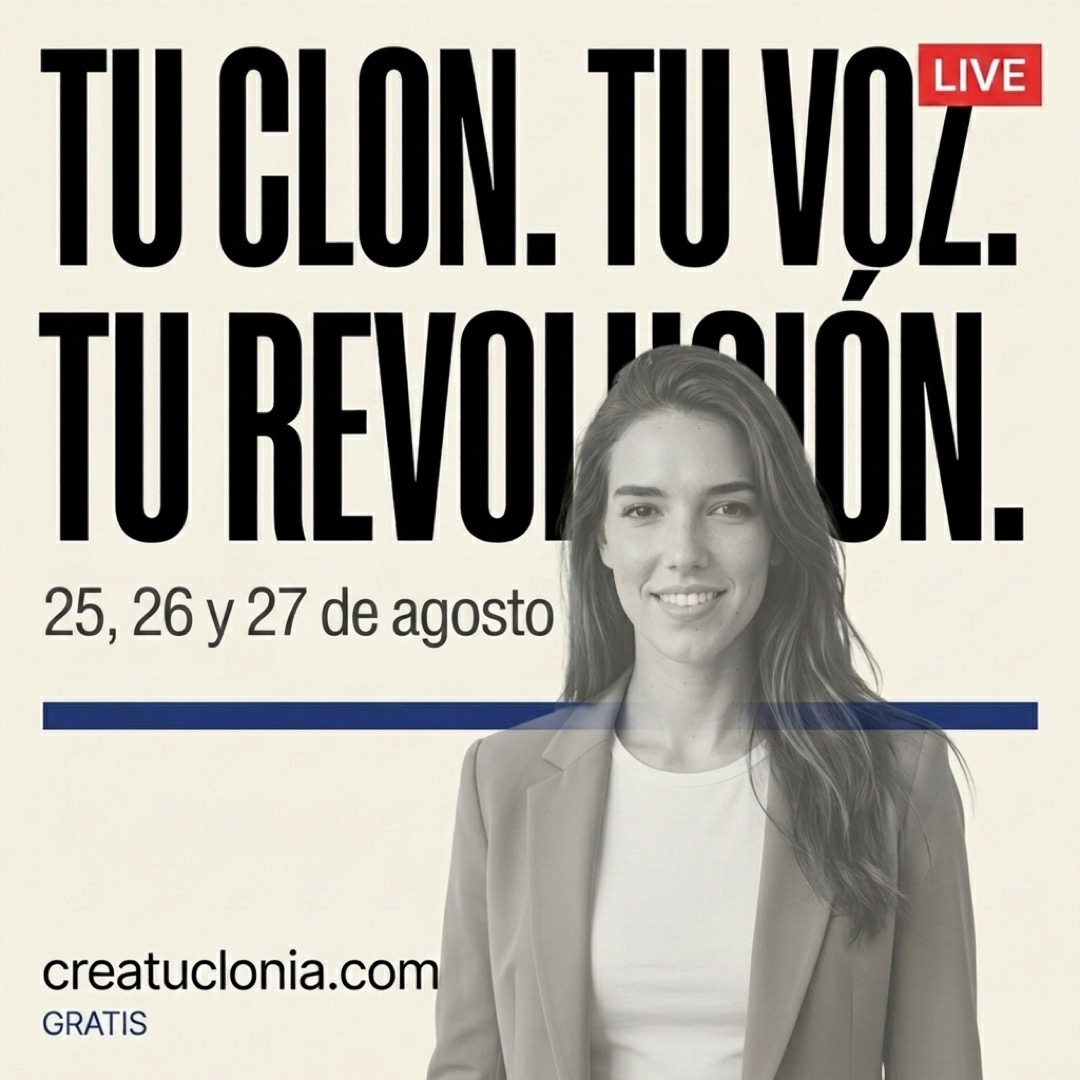
Emili · Madrid. The same creative in two languages.
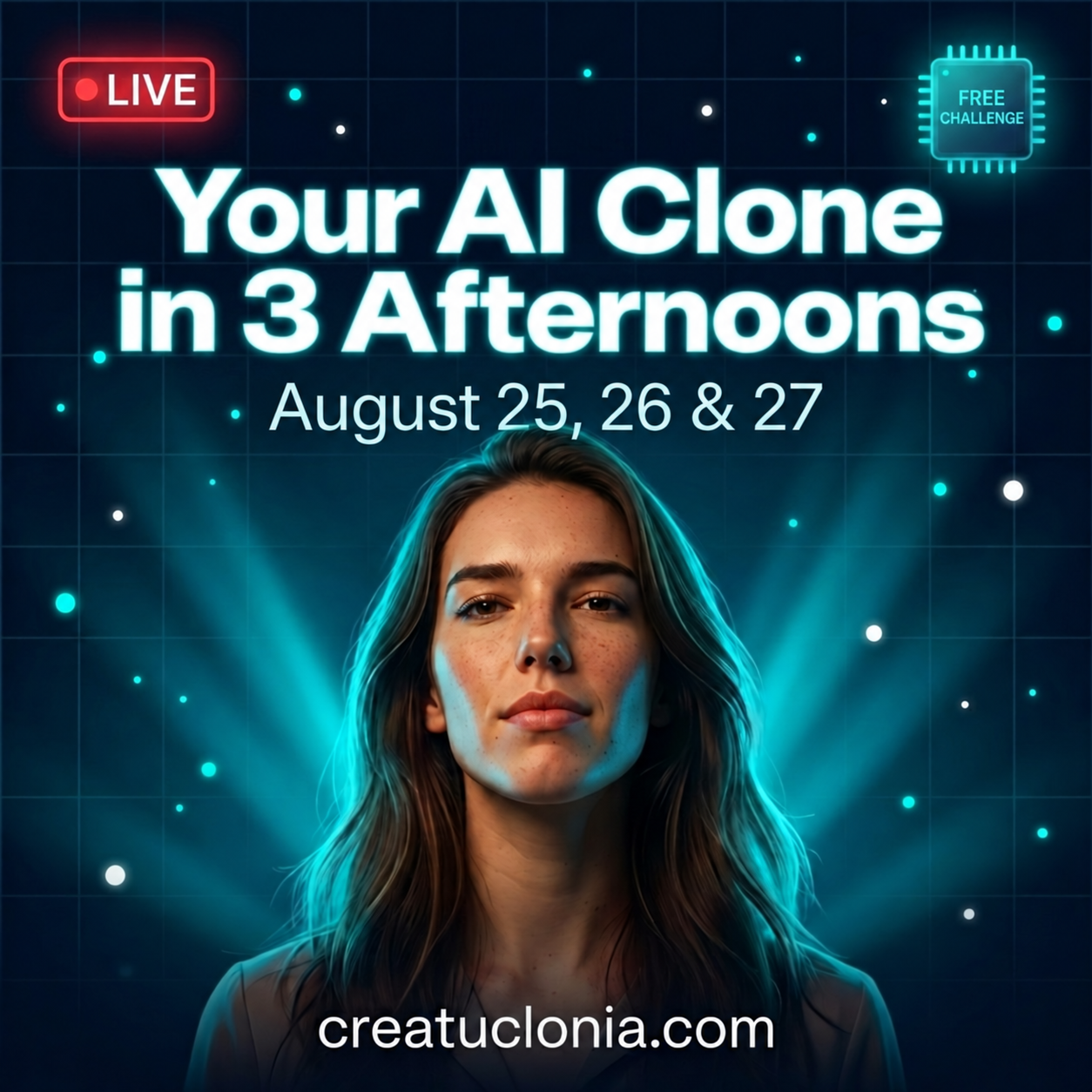
EnglishTranslation
Create your AI clone poster — August 2026 campaign — English
EspañolOriginal
Create your AI clone poster — August 2026 campaign — Español

Campaign example · August 2026

EnglishTranslation
Create your AI clone poster — August 2026 campaign — English
EspañolOriginal
Create your AI clone poster — August 2026 campaign — Español

Campaign example · August 2026

Everything you can do.
Find your next step.

Explore the features in each area. Your AI team shares your brand context to help you put ideas into practice.

Your AI assistant

Context for the conversation

AI assistant
Explore and prepare work through a conversation.
Business assets
Find your assets and bring the context of your business into the conversation.
Guidance
Find the specialty and workflow suited to your goal.

From goal to work

Strategic onboarding
Gather business information for a clear starting point.
Proposals
Ask for an approach and review it before continuing.
Actions with approval
Review proposals and confirm the next step from the conversation.

Connect your environment

Team specialties
Explore identity, campaigns, content, web and follow-up.
Account setup
Review connections and settings needed for each journey.
MCP: account permissions · API: coming soonComing soon
Coming soon: connect your agents and tools with ContentFlow.
Explore this specialty with Emili ↗
Avatars and voice

An identity you can reuse

Real or virtual persona
Organize who appears in your content and the materials representing them.
Image and video sources
Prepare visual references and avatar sources for your content workflows.
Expressions
Manage expression variants and their associated persona sources.

A voice with direction

Cloned or designed voice
Build your persona’s voice from your own source recordings.
VoiceDNA
Gather references to your communication style as creative context.
Source review
Check image, audio and preparation before generating an asset.

From identity to content

Avatars for video
Create content using your saved persona and voice.
Reels with Luca
Combine your identity with scripts, scenes and editing in social production.
Campaigns with Zadie
Bring the same recognizable presence into your ads.

Build your persona

Appearance and master photo
Define a virtual persona’s appearance or provide your clone’s reference photo.
Personality and style
Add context about the persona’s character and communication style.
Storyboard
Organize reference scenes during the setup process.
Explore this specialty with Valentina ↗
Brand identity

A recognizable brand

Visual identity
Gather colors, typography and references to guide production.
Brands and social profiles
Organize each brand and its connected profiles in one place.
Brand blocks and resources
Keep visual references and brand blocks easy to find.

A voice with context

Voice and VoiceDNA
Document how the brand communicates and its style references.
Audience
Define who you address, their needs and what they should understand about your offer.
Communication guidelines
Capture criteria and boundaries to guide generated content.

Ready for the campaign

Calls to action
Organize the next step you propose in each asset.
Sources and B-roll
Gather reference materials and visual resources for your content.
Shared context
Offers, campaigns and editorial generation can reuse brand information.
Explore this specialty with Theo ↗
Campaigns and funnels

Strategy that guides the work

Offer
Define the problem you solve and how you want to introduce your solution.
Ideal customer
Place the audience and its needs in the brief.
Competitive context
Turn your research into a stronger proposal.

Assets with one message

Campaigns
Create a campaign from saved strategy with prefilled context.
Scripts and VSLs
Prepare arguments and a sales video structure for your offer.
Content and ads
Bring campaign context to the production specialties.

From interest to the next step

Landing pages
Prepare the offer landing page from Starter.
Funnels and lead magnets
Explore funnel and lead capture tools; some are in beta.
Connected follow-up
Coordinate the campaign with email and CRM features in your plan.

Every asset has a stage

Funnel map
Organize registration, thank-you pages, VSLs, live sessions, replays, offers and checkout around your campaign journey.
Funnel types and structure
Choose a type to see the pages, sequences, links and assets that campaign needs.
Journey status
Review which pages and sequences exist, which are active, and which links or pixels are missing.

One campaign, several touchpoints

Instagram and conversations
Connect a prompt to comment with the conversation and qualification journey in Sales & CRM.
Challenge or training week
Prepare registration, classes, reminders and the offer as parts of one strategy.
Sequences and follow-up
Connect emails, avatars, pages and links to their stage; review configuration before activation.
Explore this specialty with Mateo ↗
Ideas and research

Observe your market

Inspiration sources
Organize references to guide research.
Research
Explore content and topics with AI analysis support.
Viral radar
Find content signals worth reviewing.

Analyze references

Spy Ads & Reels
Explore ads and videos to discover new hooks and creative approaches.
Trending
Explore suggested trends, formats and topics.
Finding context
Check the source, date and relevance before making decisions.

Bring it to content

Inspiration ideas
Develop proposals from what you have researched.
Your own angles
Adapt a signal to your experience and your audience’s questions.
Editorial planning
Bring context to Luca to prepare the calendar and its assets.
Explore this specialty with Noor ↗
Content and social

Plan with direction

Content angles
Develop ways to tell an idea around different needs.
Reel ideas
Prepare video proposals from campaign context.
Editorial planning
Combine brand, strategy, campaign and calendar in the production brief.

Shape the asset

Reels and video
Bring scripts, images, voice and avatars into your content production.
Posters and images
Prepare AI visual creative with brand context.
Editing and assemblies
Edit your scenes and composition to give each piece your own style.

Organize your presence

Social Hub
Bring assets together and organize their publishing queue and calendar.
Profiles and connections
Set up social accounts and check each network’s permissions.
Galleries and resources
Find Reels, assemblies and resources to continue your work.
Explore this specialty with Luca ↗
Advertising

Messages rooted in your business

Angles and Copy Engine
Develop approaches and copy to introduce your offer to different needs.
AI creative
Prepare images and videos using brand and campaign context.
Continuity after the click
Connect your ad to a landing page and sales follow-up, depending on your plan.

Meta Ads management

Campaigns, ad sets and ads
View and organize the levels of your connected ad account.
Audiences and budget
Review targeting, market, budget and schedule before activation.
Status and comments
Review ad status and Meta comments in the same workspace.

Intelligence and connections

Metrics and reports
Review spend, reach, impressions, clicks, CTR, leads and cost per result. Filter by period and use AI reports to understand performance.
Ads Intelligence
Expand your analysis from Creator to inform the next decision.
Advertising channels
Manage Meta and Google from ContentFlow. LinkedIn, TikTok, Pinterest, X and ChatGPT Ads: coming soon.

Control before scaling

Gallery and filters
Find ads by name or status and review creative alongside its data.
Audiences and remarketing
Work with audiences and demographic signals; configure the audiences your campaign needs.
Pixel, CAPI and alerts
Review your pixel, CAPI and alerts to follow what happens after the click.

Google Ads, alongside your content

Dashboard and campaigns
Review spend, clicks and conversions by date. Organize campaigns and review ads from ContentFlow365.
Search, assets and targeting
Prepare ad text and assets, review targeting and connect the campaign to your business content.
Audiences, GA4 and Customer Match
Bring your Google Ads analysis together with its audiences and measurement tools.

From click to conversion

Funnels by channel
Review the campaign journey in both Meta and Google Ads and identify the stage that needs attention.
Conversions and measurement
Review conversion actions and Google Tag coverage; in Meta, inspect pixel and CAPI.
Reports and comments
Bring performance reports and Meta comments together with your campaigns.
Explore this specialty with Zadie ↗
YouTube and editing

Before production

YouTube ideas
Develop video proposals and angles.
Scripts
Structure the idea before preparing scenes and voice.
Persona and resources
Use your identity and source materials to produce the video.

The video and its formats

Long-form videos
Produce long-form video according to plan services and credits.
Editing and thumbnails
Prepare the composition and a thumbnail introducing the topic.
Clips
Turn moments from your video into shorter pieces of content.

Your channel as context

YouTube statistics
Review metrics from the connected channel.
AI analysis
Review recommendations based on your channel data.
Comments and sponsors
Organize work with channel comments and sponsorship resources.
Explore this specialty with Owen ↗
Bots and CRM

A view of the contact

Contacts
Organize records and data within your CRM account.
Inbox
Bring your conversations together in one inbox.
Opportunities
Track sales progress through stages and next steps.

Bots with a purpose

AI qualification
Prepare questions to understand what the prospect needs.
Configured channels
Connect WhatsApp, email and your business conversation channels.
Human handoff
Hand the conversation to your team when it is time to step in.

Organized follow-up

Calendar
Organize appointments and meetings for your sales team.
Email and WhatsApp
Coordinate follow-up using workflows enabled for your account.
GoHighLevel integration
Work with contacts, conversations and opportunities using GoHighLevel technology.
Won or lost opportunities
Record the outcome of each opportunity and keep its contact and conversation together.
Explore this specialty with Samir ↗
Web and SEO

Your web presence

Pages and landing pages
Prepare landing pages from Starter and web pages from Creator.
Templates and Template Lab
Explore visual structures to present your content.
Domains
Connect your domain and present the page with your brand.

More uses for video

Video-to-blog
Generate a draft article from video content.
SEO editing
Review title, description, images and structure before publishing.
Podcast
Organize episodes, publish your RSS feed and review listening by platform. Available from Pro.

Review and follow-up

Draft and publication
Prepare and review your page, then publish it when you are ready.
Traffic
See how visitors arrive at your pages and which content attracts attention.
Calls to action
Define the next step you want each visitor to take.

A cookie banner for your landing pages

A banner that fits your brand
Enable the banner and customize its text, color, position and privacy link from Creator.
Desktop and mobile preview
Check how the banner looks in both formats before saving.
One landing page or your whole account
Save settings per landing page or copy them to all landing pages in your account.
Explore this specialty with Liv ↗
Agencies

Design your offer

Niche analysis
Explore the context to define who you want to help.
Services
Organize a service proposal around the client’s problem.
Client project
Gather the information needed for the proposal.

Explain the value

AI proposals
Prepare a document using project context.
Scope of work
Review deliverables and terms before sharing the offer.
Credit-based production
Account for generation usage when planning delivery.

Organize accounts

Subaccounts
Organize each client’s work in their own subaccount.
Agency
Agency tools from Business.
White label
Explore white label to present your services with your own identity.
Explore this specialty with Miles ↗
Statistics

How people reach your website

Visitors and conversions
Review visitors, sessions, page views, form submissions and conversion rate in the traffic dashboard.
Sources and behaviour
Review sources, devices, geography, time on page and bounce rate to understand how your audience browses.
Periods and pages
Compare periods and look at individual pages. You can also access link in bio and podcast analytics.

Which content is working

Email
Open the account’s email reports from a dedicated tab.
Social media
Review performance, posts and audience demographics for your connected accounts.
YouTube
Access videos, engagement, changes over time, audience, traffic sources and revenue when your connection provides that data.

What happens after interest

Funnels and landing pages
Explore the funnel map and its pages and sales views from Stats.
Contacts and opportunities
Move from CRM to opportunity reports to review the sales journey and its stages.
Sales and live events
Open commerce, Hotmart and Zoom live event reports when these tools are connected to your account.

One place to review your business

Eight analytics areas
Funnels, web, email, social, YouTube, CRM and sales, live events and Ads share one starting point.
Meta and Google Ads
Open their full management and analytics workspaces inside ContentFlow365 from the Ads section.
Account context
Switch between clients or businesses and review each account’s results separately.
Explore this specialty with Iris ↗
Learning

Learning with continuity

Academy
Browse courses and lessons in your account.
Progress
Resume your position and progress in lessons.
Learning resources
Find materials in the course you can access.

Learn with context

Community
Browse channels and posts in your workspace.
Conversations
Find exchanges relevant to the work you are preparing.
Live sessions
Follow your sessions and return to the recordings when you need them.

From lesson to tool

Product specialties
Connect learning to identity, content, campaigns and follow-up.
Help
Find help resources for your next step.
Resource access
Check which training and sessions your specific enrollment includes.
Explore this specialty with Camila ↗

Features and capacity depend on your plan and account connections. MCP connection available. Accessible tools depend on your account and permissions. API and the Claude Code connection are coming soon.

BEFORE YOU START

From the idea to putting it to work.

Answers to help you decide how you want to work.See the product in action ↗
What do I need to create my first AI campaign?

A clear offer, the audience you want to reach and your brand context. From there, prepare a script, create content with your avatar and give it a landing page. Add CRM and bot follow-up from Creator when you want to continue the conversation.

How do the AI directors work together?

Each specialty handles part of the work: identity, content, ads, campaigns, conversations, websites or measurement. Move between tasks in the same app using your brand context. You set the goal and review the assets before using them.

Can I turn one video into more content?

Yes. Pro’s YouTube tools let you work on long-form videos, extract clips and prepare thumbnails. You can also turn video content into blog articles and podcast episodes, adapting each format to the channel where it will be published.

How do I turn a visit into a sales conversation?

Lead people from your content or ad to a landing page with a clear next step. The CRM brings contacts and opportunities together, while bots help answer questions and qualify interest. From Creator, organize that follow-up through the channels connected to your account.

Can I work with my team or with several brands?

Yes. Choose a plan for the personas, brands, users and accounts you need to manage. Creator expands brand work and adds CRM; Pro provides more capacity and unlimited companies. Creator Agency and Pro Agency include white-label tools.

How can I see it applied to my business?

The presentation on this page shows the product in 4 minutes and 28 seconds. If you are considering Pro or a higher plan, prepare a personalized 30-minute demo and choose the priority you want to explore with the team.

CUSTOMER STORIES

Real people.
Their content, going further.

Gorka Games and David share their experience with ContentFlow365.
Gorka Games

120,600views on one video

10× its usual performance

His AI-produced video passed 120,000 views. YouTube highlighted performance ten times above the channel’s usual level.
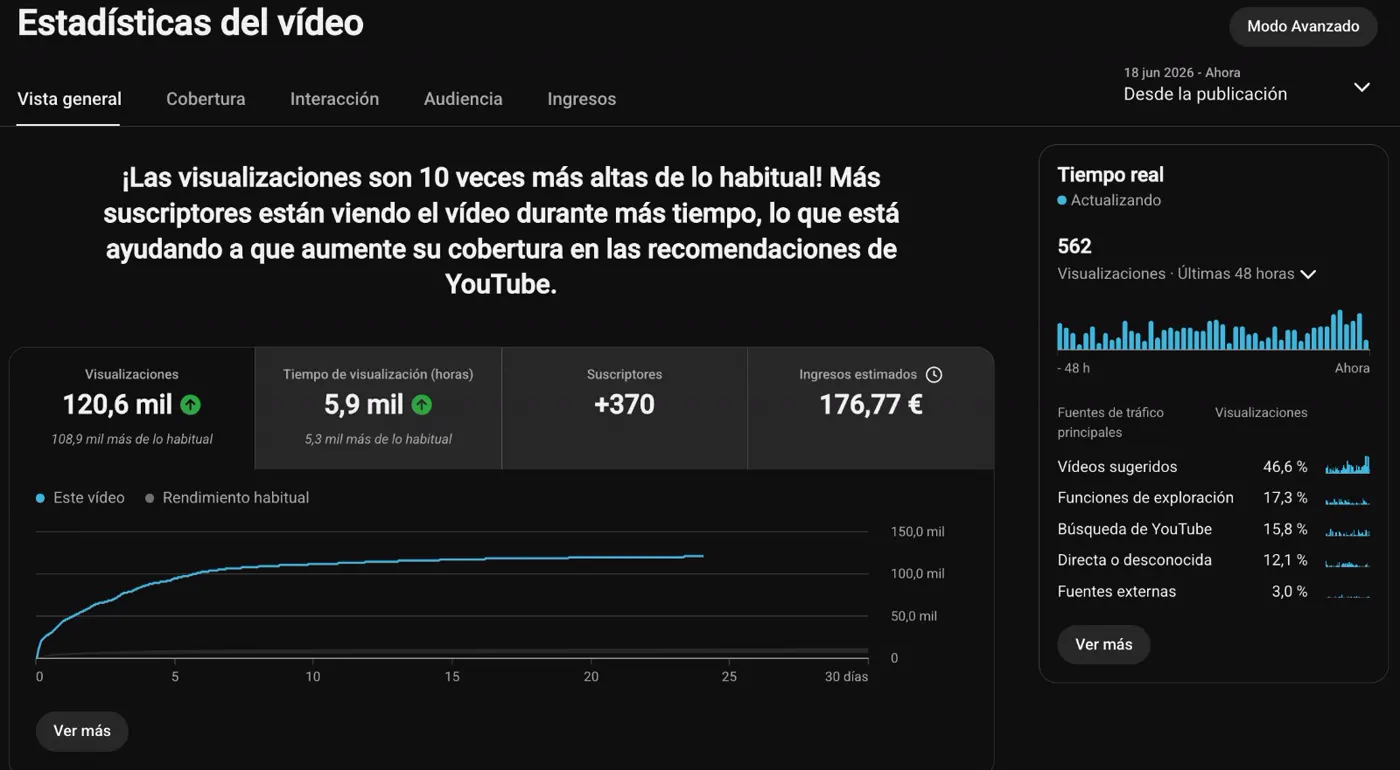
Gorka Games · 120,600 views on one video
Since publication on June 18, 2026. Screenshot published in July 2026.

“None of my long-time followers noticed that I was no longer recording myself.”

Gorka GamesGaming creator and educatorContentFlow365 customer
David Aranzabal

1.8Mviews in three months

1,796,116 in the period shown

His channel has worked with his clone since October 2024. It reached 1,796,116 views in the quarter shown.
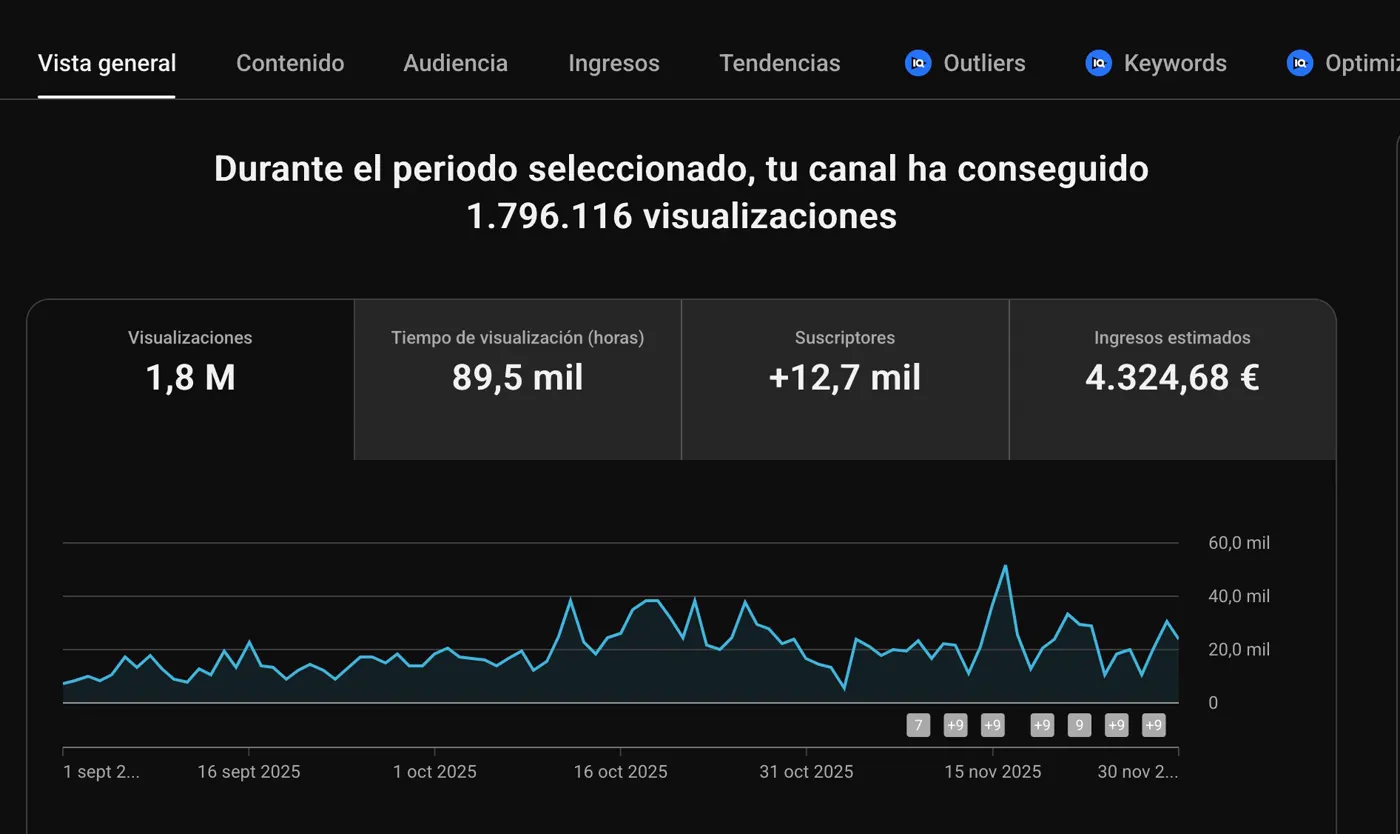
David Aranzabal · 1.8M views in three months
The 2025 quarter shown. Case published in July 2026.

“I stopped recording myself in October 2024.”

David AranzabalFounder of ContentFlow365Internal case · Education channel

Figures and testimonials published in the Crea tu Clon IA offer, July 2026. Testimonials translated from Spanish. View the original cases ↗

Your identity. Your team. Your marketing.

It all starts
with your next idea.

Start with what you need today. Connect the next step when you are ready.

See plans and pricing ↗Meet your AI team →